How to Make a Dog Talking Video at Home
Create a talking dog video from a photo or real footage, with original scripts and practical tips.
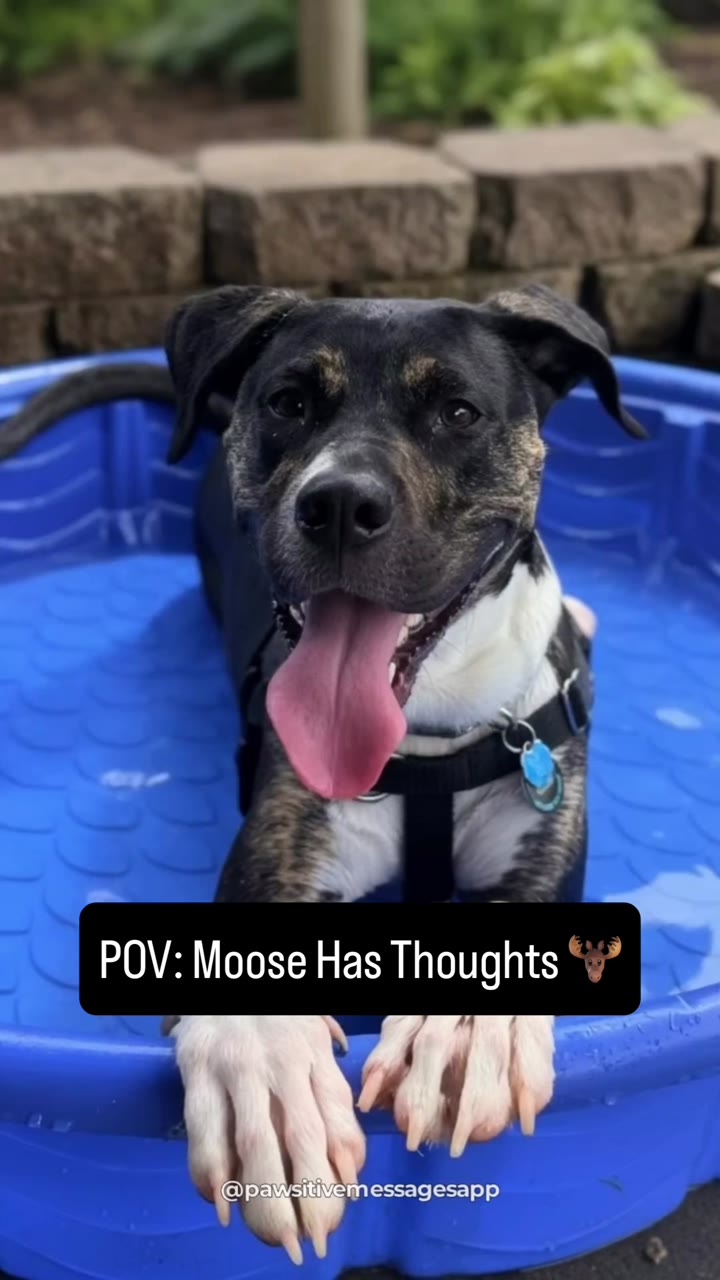
Your dog has the expression. You supply the words.
To make a dog talking video at home, you can animate a clear pet photo with a talking-pet tool or add a voiceover to footage you already have. Photo animation creates speaking movement; a voiceover lets your dog’s real reactions carry the joke. Start with one familiar habit, write a short line that sounds like your dog, and build the video around it.
Key takeaways
- Choose photo animation for a generated talking effect, or recorded footage for your dog’s real movements and reactions.
- Write around your dog’s personality: the dinner supervisor, suspicious package inspector, or enthusiastic walk negotiator.
- Keep the first attempt focused on one joke. Let the dialogue determine the length.
- Use a clear face photo or well-lit footage, with room for captions.
- Pawsitive Messages helps bring your actual pet’s personality into personalized messages, scenes, and videos.
What do you need to make a talking dog video?
You need a pet photo or short video, a simple script, and a tool suited to the result you want.
| Method | Starting material | What you create |
|---|---|---|
| Animate a photo | A clear photograph of your dog | Generated movement that makes the pet appear to speak |
| Add a voiceover | Existing or newly recorded footage | Your dog’s real reactions paired with imagined dialogue |
A voiceover doesn’t automatically make the mouth match the words. If synchronized speaking movement matters to you, look specifically for a tool with talking-pet or lip-sync functionality.
How to make a dog talking video from a photo
1. Choose a photo with a clear face
Pick an original, high-quality image where your dog’s eyes, nose, and mouth are easy to see. Even lighting and an unobstructed face give the tool useful visual detail. Avoid heavy blur, strong shadows across the face, or a toy covering the muzzle. Follow the chosen tool’s photo requirements.
2. Give your dog something specific to say
Choose a situation your household recognizes. Perhaps your dog hears every snack wrapper, insists dinner is late, or considers your side of the bed communal property. A specific complaint gives the video a story: “You said a quick walk. I haven’t inspected anything.” The goal is a line that makes someone who knows your dog say, “That sounds exactly like him.”
3. Create the talking effect
Follow your chosen tool’s process for adding dialogue and creating the video. Some tools use typed scripts, some accept recorded audio, and others guide you through a themed experience. Check the supported duration and cost before generating. A long conversation may need several clips rather than a single generation.
4. Review the result
Watch the eyes, markings, muzzle, and mouth movement. Listen for unclear words or awkward pauses. If the dialogue sounds rushed, shorten it. If the result changes your dog’s appearance noticeably, try a clearer reference photo or adjust the creation using the options available.
5. Add captions and save
Readable captions help viewers follow the dialogue with or without sound. Check their spelling and keep them clear of the eyes and mouth. For a full-screen short-video post, prepare a vertical version and leave room around text for the platform’s interface.
Read the video dialogue
Mom uploaded a photo of me. I don’t fully understand what’s happening either, but since I have everyone’s attention, the pool should be bigger.
How to make a talking dog video using real footage
If you already have a great head tilt, patient stare, or suspicious glance on your phone, start there. Write dialogue that suits the reaction you captured.
- Position the phone at your dog’s eye level.
- Use soft daylight that illuminates the face.
- Record vertically if you want a full-screen short-video version.
- Keep the session relaxed and brief.
- Use a familiar dog-appropriate reward if needed, and stop if your dog loses interest.
You do not need to make your dog move its mouth on command. A silent stare paired with the right line can be the whole joke.
Record the voiceover in a quiet room, then add it in a video editor with audio-recording or import features. Trim pauses and place the funniest line beside the strongest reaction. This creates a dubbed video. Precise lip-sync requires a separate animation feature.
How do you write a funny talking dog script?
Start with something your dog wants and give them a distinctive way of asking for it. A dramatic dog might treat a late dinner as a household emergency. A patient dog might deliver a quiet, devastating complaint. A mischievous dog might explain why the evidence proves absolutely nothing.
- The request: What does your dog want?
- The argument: Why do they believe they deserve it?
- The punchline: What makes their reasoning funny?
You don’t need all three for every video. Sometimes one sentence and a well-timed look are enough. Read the script aloud before creating the video. Shorten anything that feels difficult to say naturally.
Funny talking dog video scripts to try
These original examples are starting points. Change the words to match your dog.
The walk negotiation
- Human: “We just went outside.”
- Dog: “That was the preview.”
- Human: “The preview?”
- Dog: “The full walk includes squirrels.”
The dinner complaint
- Dog: “Dinner is late.”
- Human: “It’s four o’clock.”
- Dog: “I’m reporting this to management.”
- Human: “I am management.”
- Dog: “That explains the service.”
The bacon negotiation
- Human: “That’s my breakfast.”
- Dog: “I’m offering quality control.”
- Human: “You already ate.”
- Dog: “My qualifications are extensive.”
The cat-treat investigation
- Human: “Were you near the cat treats?”
- Dog: “Define near.”
- Human: “Your nose was in the jar.”
- Dog: “Then the investigation is progressing.”
Bacon can be part of the fictional conversation without being fed to your dog. Use an appropriate reward during filming. Keep the cat treats out of reach; the joke works through dialogue and expression.
What makes a talking dog video feel like your dog?
Recognition is what makes a personalized video different from a generic animal joke. Think about the expression your dog gives you when you pick up the leash, the way they supervise cooking, or their reaction when someone takes their favorite seat. Build around those details. The face, words, and situation should feel connected.
With Pawsitive Messages, your pet’s photo and personality are the starting point for personalized messages, scenes, and videos. The aim is a familiar character your family recognizes.
Explore Pawsitive Messages experiences and choose an idea that fits your pet.
How long should a talking dog video be?
Make it long enough to deliver the joke clearly, then end. For a first attempt, a brief clip with one or two spoken lines is a manageable starting point. A longer exchange needs more time for the audience to understand who is speaking and enjoy the reaction.
Check your creation tool’s duration limits before writing a multi-line script. If you need several clips, plan where they will join. There is no single runtime that guarantees views or shares. Test different cuts using your own audience’s response.
How do you prepare a talking dog video for TikTok, Instagram, or Facebook?
Show the dog and introduce the situation early. Remove any opening that delays the reason to watch.
- Review the vertical crop.
- Make captions readable on a phone.
- Keep important text away from interface overlays.
- Check that dialogue is audible.
- Choose a cover frame with a clear expression.
- Use a post caption that describes the actual joke or situation.
A caption such as “My dog’s official complaint about dinner” tells viewers what to expect. If you are promoting your creation process, explain what someone can make with their own pet photo and give them one clear next step.
Frequently asked questions
Can I make a talking dog video with just my phone?
Yes. You can use a mobile-compatible photo-animation tool or record footage and add a voiceover in a phone video editor. Check the tool’s export options before starting.
Can I make a talking dog video from one photo?
Many talking-pet tools support a single photo. The result depends on the image, the tool, and the requested movement. Check that the finished pet remains recognizable.
Do I need to film my dog moving its mouth?
No. Photo-animation tools generate movement. For a dubbed video, your dog’s natural expression or head tilt can support the dialogue without matching every word.
Can I make a talking dog video for free?
Some tools offer free credits or limited features. Check whether those cover video generation, audio, and downloading the finished result. Pawsitive Messages uses Treats for creation. Review the current requirements for your selected experience; free Treats do not necessarily cover a complete video immediately.
How do I make the voice match my dog’s personality?
Start with how you already imagine your dog speaking. Choose a familiar situation, use words that fit their attitude, and keep the dialogue easy to follow.
Can I use the same approach for a cat?
Yes. Choose a clear photo or natural footage and write around your cat’s particular habits and expressions.
Give your dog something to say
Start with the photo that already makes you laugh. Add the words you imagine behind that expression.
Related articles
Pet Personality & Videos
How to Make a Funny Pet Video Friends Actually Watch
Read articlePet Video Storytelling
How Much Does a Pet Video Need to Say? We Analyzed Hundreds of Finished Videos
Read articleAI Pet Video Guides
Why AI Pet Videos Look Weird—and How to Fix Them
Read articlePet Voice